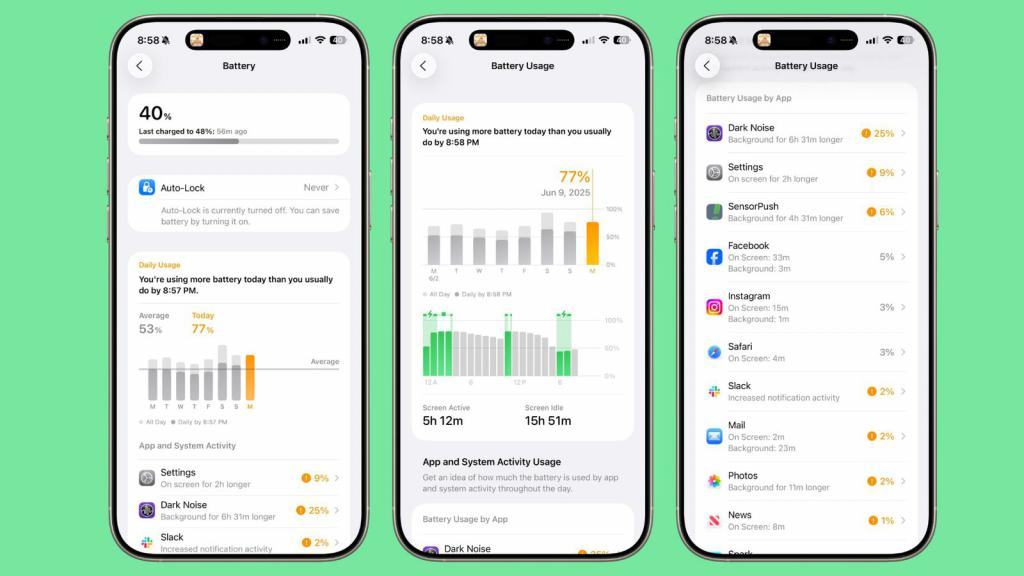
Redesigned Battery Interface: Clearer Information
In iOS 26, Apple has completely revamped the battery settings page:
- The top section now shows current battery percentage and last charge time;
- When charging, users can see time remaining until full charge or set limit;
- The battery icon reflects status, turning gray when charging is paused due to optimization or temperature.
These updates make battery status more intuitive at a glance.
Power Analysis: From “24 Hours” to “Weekly Average”
The biggest change lies in power usage statistics:
- The previous 24-hour / 10-day views are replaced with a weekly average view;
- A new comparison tool highlights whether usage is above or below normal levels;
- Apps with unusual power drain are flagged with details and alerts.
This helps users not only see where energy goes but also identify when usage is abnormal.
App-Level Details: Clear Reasons for Drain
The new detail page offers deeper insights:
- Shows whether power drain comes from background activity, screen-on time, or frequent notifications;
- High-drain apps are highlighted in orange for quick recognition;
- Users can view seven days of detailed history, including active vs. idle drain and charging sessions.
Battery Health & New Adaptive Mode
Battery health monitoring remains, showing cycle counts and maximum capacity. Charging can still be capped at 80%.
The highlight is the new Adaptive Power Mode:
- Automatically activates when abnormal drain is detected;
- Adjusts performance by dimming brightness, delaying tasks, or enabling Low Power Mode at 20%;
- Powered by Apple Intelligence, available only on iPhone 15 Pro and later;
- Optional notifications alert users when the mode is activated.
Smarter Charging Experience
Charging has also been enhanced:
- Connecting to power lets users tap the screen to see remaining charge time;
- At 20% battery, Dynamic Island displays a low power warning with one-tap activation.
Conclusion:
The five key battery upgrades in iOS 26 focus on intelligence and transparency. With Adaptive Power Mode extending life and clearer data making consumption visible, iPhone users gain a more practical and reliable battery experience.